
AI memory
AI memory records key context from chats and automated tasks for each workspace and uses it in later conversations. Once a memory is saved, it's automatically applied to future chats, so you don't have to explain the same background every time.
What does it remember?
Insights and decisions: Important conclusions reached in chat and actions you repeat often
Tool learning: What the AI learned through trial and error while pulling platform data, and how to handle it more accurately
Business context: Key KPIs, seasonal issues, brand preferences, and work style
Bid history: Records Smart Bidding's bid changes so they can be referenced in the next optimization.
How does it build up?
Saved automatically: Important details are recorded automatically as you chat with the AI.
Manage it in real time from chat: Mid-conversation, say “Save this to memory” to add information right away, or “Delete the memory you just saved” to remove anything you don't need.
Linked to automations: Every time an automation tool such as Smart Bidding runs, it logs its changes in memory.
Add your own: Enter important information yourself from Workspace > AI memory.
Manage memories
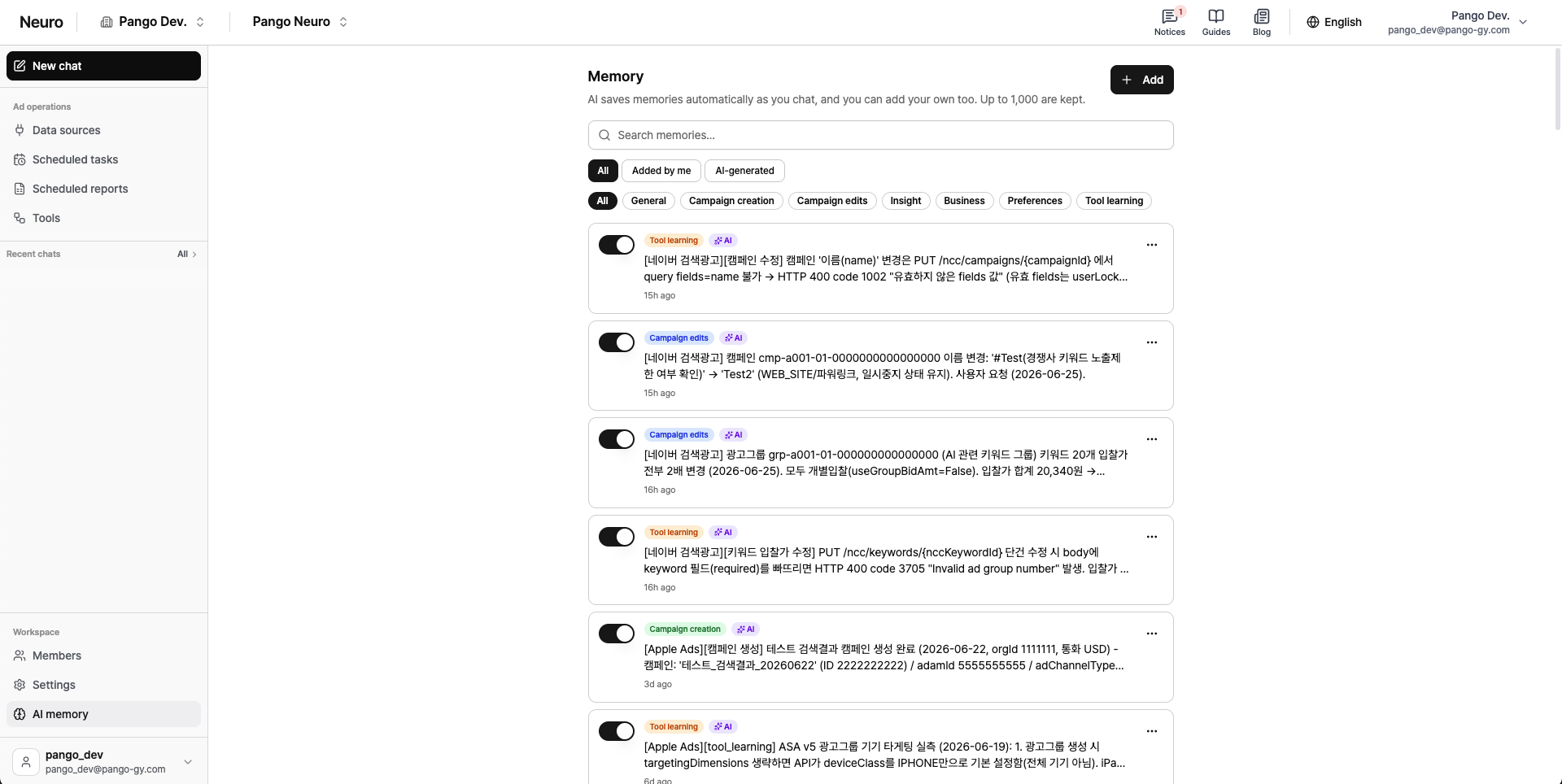
Edit freely: In Workspace > AI memory, you can add, edit, and delete memories yourself, and toggle each one ON/OFF.
Tags: Keep memories organized by tag, such as General, Campaign creation, Campaign edits, Insight, Business, Preferences, and Tool learning.